What’s up, network folks? If you’re running a storage area network (SAN) — you know, the backbone for all your organization’s critical data, from backups to high-volume app storage — then you’ve probably run into that annoying bottleneck: how to move massive amounts of storage traffic without cluttering up your racks or blowing your budget on messy cables. That’s where I come in. I’m the guy who supplies MPO patchcords, and I hear this question all the time: “How the heck do I actually use these things right in a SAN, instead of just letting them collect dust on my shelf?” Let’s cut the jargon, skip the tech bro fluff, and get into what actually works, from someone who sells these every single day to folks just like you. Mpo Patchcord
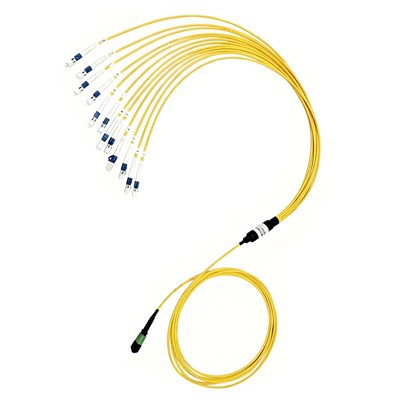
First, let’s get one thing straight: SANs aren’t your average office Wi-Fi. These are dedicated networks that connect servers to storage arrays (think: a bank’s customer data, a hospital’s patient records, a retailer’s inventory logs). The key here is low latency and high density — you don’t want to add 10 extra cables taking up rack space, right? MPO (Multi-fiber Push-On) patchcords are designed to bundle 8, 12, or even 24 fibers into one single connector. That means one cable does the work of 8 or 12 individual LC or SC cables. For SANs, which often need 10G, 25G, or even 100G speeds, that’s a game-changer. But a lot of people mess this up, so let’s start with the basics: which MPO type to pick for your SAN.
Wait, let’s not skip the why. If you’re using a traditional patch cord setup in a SAN, you might have 48 ports on your switch, each needing a separate cable. Multiply that by a few racks, and you’re looking at a rat’s nest of cables. MPOs solve that by letting you daisy-chain or use trunking. But here’s the thing: not all MPOs are made equal for SANs. I see customers order the wrong MPO all the time — like, ordering 12-fiber MPO for a 25G SAN, when they actually need 24-fiber to future-proof. Let’s break that down. Most modern SANs use 25G SFP28 transceivers or 100G QSFP28 modules. For a 100G link, you need a QSFP28 port, which breaks out into four 25G connections. That means a single 12-fiber MPO works here — because each of the four 25G lanes takes two fibers (one for transmit, one for receive) so 8 fibers total, leaving 4 spares. But if you’re scaling up to 400G, you’ll need a 24-fiber MPO, because QSFP-DD ports break out into eight 50G lanes, which needs 16 fibers, so 24 gives you enough spares and extra room for upgrades. Pro tip from my side: if you’re a mid-sized company expanding your SAN, don’t buy one-off MPOs. Buy bulk, 24-fiber SMF (single-mode fiber) for long-haul SAN links between racks, and 12-fiber MMF (multi-mode fiber) for short runs within a single rack. MMF is cheaper, works great for 100G up to 100 meters, which is perfect for in-rack storage connections.
Now, the big question: how to actually install MPO patchcords in a SAN without breaking anything, or having to re-cable six months later. Let’s walk through the step-by-step that I’ve seen hundreds of customers pull off successfully. First, map your SAN topology. You can’t just plug cables willy-nilly. Your SAN has three main parts: servers with host bus adapters (HBAs), switches (SAN switches, usually Brocade or Cisco), and storage arrays. Each HBA and switch port will have a transceiver — that’s where your MPO connects. So first, list every device: how many HBAs, how many switch ports, how many storage array ports. Then, calculate how many fibers you need. For every switch port, you need two fibers (TX and RX) plus spares. If you’re using breakout cables (which are super common for SANs), a single MPO-to-4xLC breakout cord will turn one MPO port into four separate LC ports for your 25G links. That’s way better than using four individual cables, because one MPO takes up less space and has less chance of a loose connector.
Next, handle the MPO connectors correctly. I can’t tell you how many times a customer sends a note saying “my MPO is not working” and it’s because they flipped the pins. MPO connectors have keyed ends — male and female, right? Wait, no, actually, MPO has two main types: Type A (straight polarity) and Type B (reverse polarity). For a basic point-to-point SAN link, if you’re using a breakout cord, Type A is what you want. Let me simplify that: Type A means the pin 1 on one end lines up with pin 1 on the other end. Type B is for when you’re doing a fan-out that crosses lanes, which most SAN setups don’t need — so save Type B for if you’re building a long-reach SAN, not your daily in-rack stuff. Also, never pull an MPO cable by the cord itself — grab the connector housing. The fibers inside are tiny, and a hard pull can break them, which means you’re buying a whole new cable. And store your MPOs in their dust caps when not in use — SAN racks are dusty, and dust on a connector will kill your signal, leading to dropped storage traffic.
Then, termination is huge. Wait, are you terminating the MPOs yourself, or buying pre-terminated? If you’re a small team, pre-terminated is the way to go. Pre-terminated MPOs from a reputable supplier (that’s my side) are tested before they leave, so you don’t have to deal with messy field termination. Field termination for MPO is doable, but it requires special tools — a cleaver, epoxy, a polishing machine — and one wrong step, and the fiber is ruined. I’ve had customers who tried to terminate their own MPOs call me up in a panic because their signal loss was 3dB higher than it should be — that’s enough to make a SAN drop a connection. So my recommendation: unless you have a certified fiber tech on staff, buy pre-terminated MPO patchcords. They’re not that much more expensive, and they save you hours of troubleshooting.
Now, let’s talk about common SAN use cases, because that’s where people get confused. First, in-rack SAN connections: your storage array is in the same rack as your SAN switch. So you need short MPOs — 1 to 3 meters. These are usually 12-fiber MMF breakout cords, connecting the switch’s QSFP28 ports to the storage array’s QSFP28 ports. For example, a Cisco 9300 SAN switch has QSFP28 ports that can handle 100G, breaking out to four 25G links for each storage blade. Using a single MPO here means one cable instead of four LC cables, so less clutter in your rack. I’ve seen this cut cable count by 75% in small SANs — that’s a big deal when your rack is already full of servers and power units.
Second, inter-rack SAN connections: if you have storage arrays in multiple racks, you need longer cables — 5 to 20 meters, maybe even more for data centers. Here, single-mode fiber MPOs are better, because they have lower signal loss for long runs. For a 400G SAN link between two racks, a 24-fiber SMF MPO will work perfectly. You can also use MPO trunk cables here, which are just long MPOs with connectors on both ends. Just make sure to check the polarity again — for inter-rack links, Type A is still fine, but if you’re using a trunk to connect to a patch panel, make sure the patch panel is keyed for MPO. Oh, and another thing: label every single cable. SANs are complex, and six months from now, when you’re expanding, you don’t want to trace a 10-meter MPO to figure out which storage array it’s connected to. I always recommend color-coding: blue for SMF MPOs, orange for MMF MPOs, so you can spot the right cable at a glance.
Third, future-proofing your SAN. Let’s say you’re a mid-sized company now, but in two years you’re expanding to 100 servers. If you buy 12-fiber MPOs now, when you upgrade to 400G, you’ll have to replace all your cables. Buy 24-fiber MPOs now — even if you’re only using half the fibers — and you’ll have room to scale without recabling. That’s a mistake I see all the time: companies buy the minimum MPO they need today, and end up spending twice as much later. Trust me, the extra $5 per cable is worth it to avoid a full recable job.
Now, troubleshooting tips from someone who’s fixing SAN MPO issues every week. If your SAN is dropping connections and you think it’s the MPO, first check the dust caps — did you forget to take them off? I’ve had so many customers call me thinking their cable was bad, and it was just a dust cap on one end. Next, check the polarity: if you’re using Type A, make sure pin 1 lines up. If you get a cross-connect between TX and RX, that’s a big problem, but with breakout cords, that’s usually pre-configured correctly if you buy from a good supplier. Then, check signal loss: MPOs should have less than 0.75dB loss for multi-mode, less than 0.5dB for single-mode. If it’s higher, the connector is probably dirty — use a fiber cleaning pen (no liquid, that’s for LC and SC, MPO needs a dry pen) to clean both ends. Never use a paper towel or compressed air on an MPO, that can scratch the fibers.
Wait, let’s address a common myth: MPOs are only for data centers, not for small SANs. No, that’s not true. Even a small business SAN with two servers and one storage array can use MPOs. You can get 1-meter 12-fiber MMF MPOs for under $30, which is way cheaper than buying four LC cables (which would be around $20 each, so $80 total) plus the time to terminate them. For small SANs, the cost savings and less clutter are huge. I’ve got a customer who runs a 10-server SAN for a marketing agency, and they switched to MPOs last year — they cut their cable mess by 80% and saved over $2,000 in cable costs for expansion.
Another myth: MPOs are less reliable than individual cables. No, if you use them correctly, they’re actually more reliable. There are fewer connectors, so fewer points of failure. Individual cables have four connectors, while an MPO breakout has two connectors (the MPO end and four LC ends) — wait, no, actually, a breakout cable has one MPO connector on one end and four LC on the other, so that’s five connectors total, vs. four separate cables which have eight connectors. So less connectors mean less chance of a bad connection. That’s a big win for SANs, because downtime on SANs is expensive — a one-hour outage can cost a retail company $100,000 or more in lost sales. So a more reliable cable setup is worth it.
Now, let’s wrap this up with what you need to actually do to get started. First, audit your current SAN: count all ports, measure cable runs, note your current speed needs (10G, 25G, 100G). Second, decide on your MPO type: 12-fiber MMF for in-rack, 24-fiber SMF for inter-rack, Type A polarity for basic setups. Third, buy pre-terminated MPOs — don’t DIY unless you have the skills. Fourth, label every cable and color-code them, and store spares in a dust-free bin in your server room.

If you’re in the market for MPO patchcords for your SAN, or you’re not sure which type is right for your setup, reach out. I’m here to help you pick the right cables, answer any questions about polarity or termination, and make sure your SAN setup is clean, fast, and reliable.
FTTH References
- Cisco Systems. (2022). Cisco Multi-fiber Push-On (MPO) Cable Deployment for Data Centers and SANs. Cisco Press.
- Brocade Communications Systems. (2021). SAN Scalability with MPO Trunk Cables: Best Practices. Brocade Technical Support Whitepaper.
- Fiber Optic Association. (2020). MPO Connector Polarity and Termination Guidelines for Enterprise Storage Networks. FOA Standards.
- International Electrotechnical Commission. (2019). IEC 61754-22: Fiber Optic Connectors – MPO Connector Interface Standard. IEC.
Brolink Technologies (Dongguan) Co., Ltd.
As one of the most experienced mpo patchcord manufacturers and suppliers in China, we offer a wide range of products with superior quality. We warmly welcome you to buy high-grade mpo patchcord in stock here and get quotation from our factory. For price consultation, contact us.
Address: Room 201, Unit 2, Building 16, 77 Dongguan Science And Technology Park, Shilong Road, Guanlong Road, Dongcheng District,Guangdong province,China
E-mail: scwang@brolinktech.com
WebSite: https://www.brolinkopt.com/
